Rewards: authorize, dispatch, fund
A reward moves through three things you’ll deal with: you authorize it against a tip, it gets dispatched to actually pay out, and a reward fund keeps a running balance and history behind both.
Authorize a reward
Section titled “Authorize a reward”There are two ways in:
- From the tip itself. Open its action panel and choose Log reward. Here you can also attach an outcome — arrest, charges filed, property recovered, drugs seized, or another reason — and a case reference, both optional.
- From the Rewards page. Choose New reward and search for the tip by its investigator reference or external case number. This form takes only an amount and a reason; it doesn’t capture an outcome or a case reference.
Either way, an amount and a reason are required, and both are program-admin actions. The reason is an internal anti-fraud record, never shown to the tipster. Every reward you create starts in the same place — authorized — whatever else you fill in; there’s no way to create one that’s already paid.
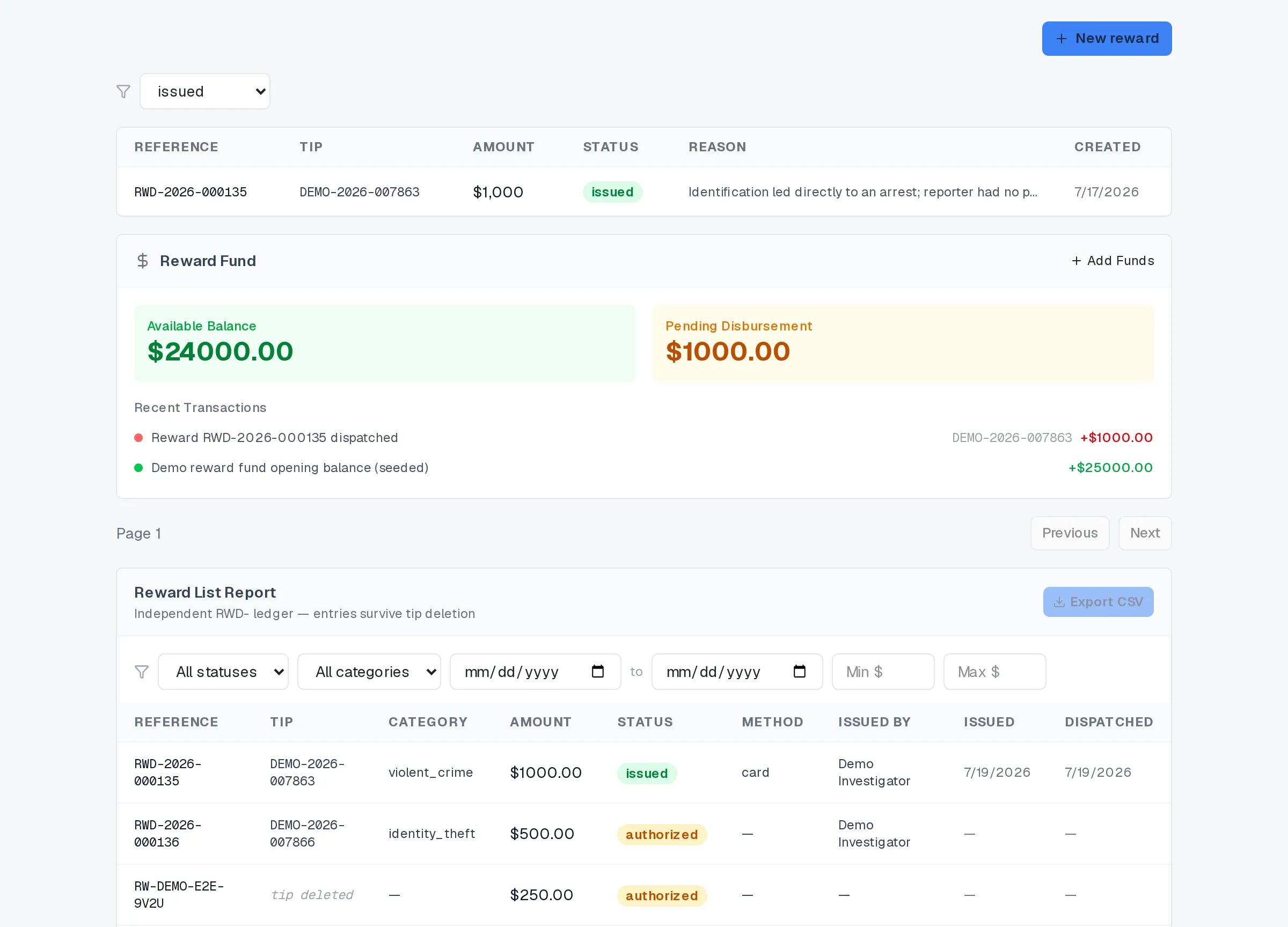
Rewards: issued rewards and the fund.
What dispatching a reward does
Section titled “What dispatching a reward does”An authorized reward is a commitment, not a payout. Dispatching one is the step that turns it into money moving, and it happens as a single unit: the reward is marked issued and stamped with who dispatched it and when, the reward fund is debited for the exact amount, and — unless the tip has since been deleted — the tipster gets a message in their case thread that a reward is ready to receive.
Dispatch never runs twice on the same reward; a second attempt on one already issued, cancelled, or otherwise moved on is refused outright, so nothing can be paid out twice. It also never runs if the fund can’t cover it — a reward larger than the current balance is refused rather than pushed through and left to overdraw the fund.
If the tipster already chose how to receive it, cash or a prepaid card, dispatch uses that choice. Card details are encrypted into the reward record at that point and never appear in an audit row or a report.
From issued, a reward reaches its own end: redeemed once the tipster receives it, or expired if they never do. A reward your program decides not to pay is cancelled instead, without ever being dispatched. Authorizing, dispatching, and cancelling are each logged — who acted and when — and none of it needs the tipster’s name, because a reward record has nowhere to put one.
Track the reward fund
Section titled “Track the reward fund”The Reward Fund panel on the Rewards page shows what’s actually available: the current balance, and separately, what’s still owed on rewards that are issued but not yet paid out. That second figure comes from the ledger itself, not from a guess based on status alone.
Adding funds is a program-admin action: an amount and an optional note, appended to the same append-only ledger that dispatch debits from. Because both directions run through one ledger, the balance after any single deposit or payout is always traceable to one entry in the transaction list under it, newest first.
A reward outlives its tip
Section titled “A reward outlives its tip”Deleting a tip doesn’t delete its rewards. The record survives, no longer linked to a tip, and the Rewards list marks it “tip deleted” rather than dropping the row — so a payout stays there to review even after the case behind it is gone.
Reporting
Section titled “Reporting”The reward report at the bottom of the Rewards page filters by status, category, date range, and amount, and exports the result to CSV. Card numbers and PINs are never in it — not filtered out, just never selected in the first place. Exporting needs at least one filter set, and is capped in size by your role and rate-limited per hour.
Related
Section titled “Related”- Getting started as an operator
- Messaging a tipster
- Insights, reports, and data export
- Rewards and demo honesty
If a reward needs to move somewhere this page doesn’t take it, or its status doesn’t match what you expect, your program admin can look into it.