Crime of the Week authoring
Crime of the Week is a single featured case your program posts to its own public page — a title, a write-up, and optionally a photo and a reward line — to prompt tips on that case. You build and publish it from Settings.
Where to find it
Section titled “Where to find it”Open Settings and choose the Crime of the Week tab. This screen needs administrator access; if you don’t see it, ask your program admin.
Creating a post
Section titled “Creating a post”- Select New Post.
- Write a title and a description. Both are required; everything else on the form is optional.
- Set a reward amount if one is being offered. Any amount above zero adds the reward banner described below.
- Add a category and a location if they help a reader place the case.
- Add a Tip Link Code if you want the post’s Submit a tip button to land on a specific category in your submit form, regardless of the category label shown on the post itself. Leave it blank and the category label is used for that instead.
- Add a photo if you have one (see below).
- Set an expiration date if the post should stop showing itself on its own.
- Check Publish immediately to make the post live right away, or leave it unchecked to save a draft you can publish later.
- Select Create Post.
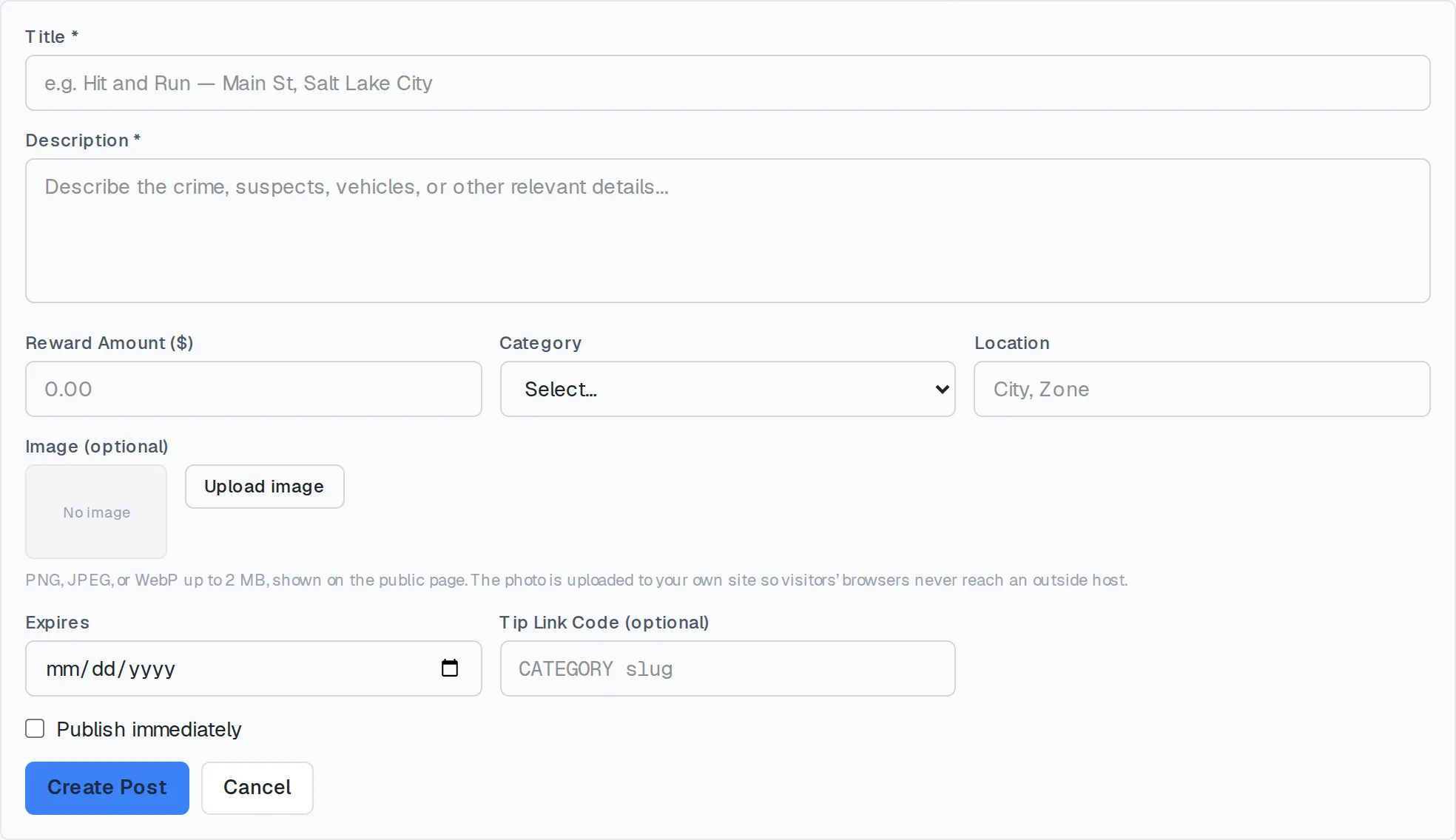
The Crime of the Week form.
Adding a photo
Section titled “Adding a photo”Photos are uploaded, not linked. There’s no field for pasting an image address: you pick a file from your device, and it’s copied onto your own site’s storage before anything reaches the public page.
That’s deliberate: a pasted link to an outside image host would let that host see every visitor who loads the page, before they’ve done anything but look. Uploading keeps a visitor’s browsing private, because the photo never leaves your own site.
PNG, JPEG, and WebP are accepted, up to 2 MB. Upload a new file to replace an existing photo, or remove it to go back to no photo at all.
The reward banner
Section titled “The reward banner”Set a reward amount above zero and the public page shows a banner naming that amount, with a line reminding the reader that reporting stays anonymous. Leave the amount blank, or at zero, and the banner doesn’t appear. The rest of the post looks the same either way.
Publishing
Section titled “Publishing”Only the most recently published post that hasn’t expired shows on the public page at any one time. Publishing a new post doesn’t take an older one down automatically: if you leave a previous post marked live, it keeps that label in your list, but visitors only ever see whichever live post was published most recently.
Managing existing posts
Section titled “Managing existing posts”From the post list, the eye icon publishes or unpublishes a post, the link icon copies the public page’s address, and the external-link icon opens that page for you to check. Deleting a post removes it permanently; it doesn’t touch any tip or case record, since a Crime of the Week post is a marketing surface, separate from whatever tips it prompts.
Related
Section titled “Related”The same reasoning behind requiring uploads instead of pasted links — keeping a visitor’s browsing from reaching an outside host — is described for reporters in Anonymity.