Recipient portal administration
A recipient’s portal login lets an agency you route tips to sign in and see its own cases, without waiting on your team for every update. You invite that login, and you can end it, from Recipient Access in the operator console.
Inviting a recipient
Section titled “Inviting a recipient”Recipient Access lists every active recipient in your directory. Select one to open its panel: every login it already has, and a form to add another.
- Open Recipient Access.
- Select the recipient from the list.
- Enter the contact’s email, and a name if you have one.
- Choose Send invite.
TypVault doesn’t send the link on its own. Copy the one-time link it hands you and deliver it yourself, the way your program already reaches that agency.
The link works once, and only for 72 hours. Opening it lets the agency set its own password; the login activates the moment that happens, not before.
Until it’s used, the login sits as invited. Once redeemed, it turns active. If you end it later, it turns revoked, a state it stays in.
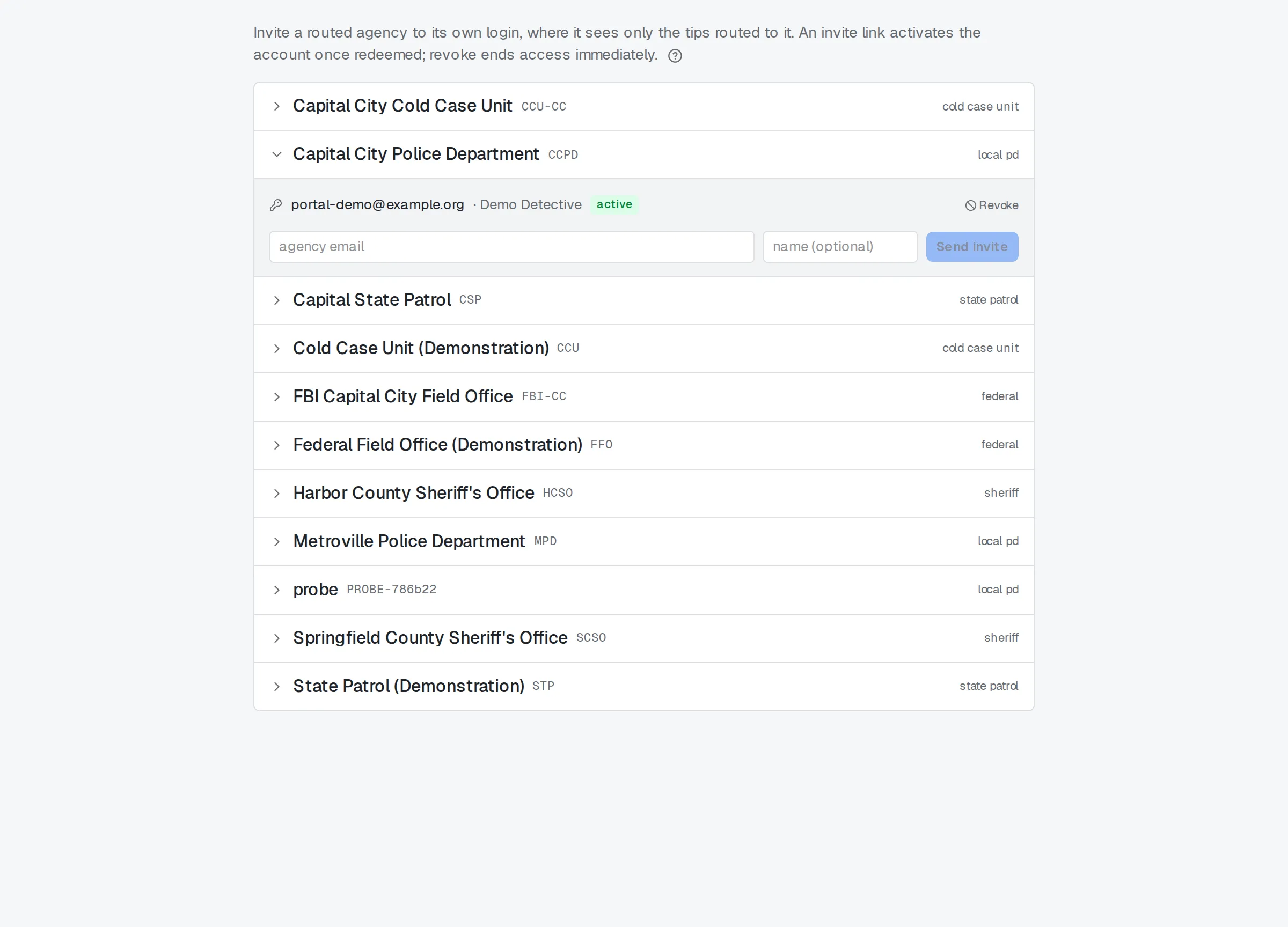
Recipient Access: inviting an agency.
What the login can see
Section titled “What the login can see”Every case routed to a recipient shows its portal exactly four fields: the reference your team assigned, the category, the status, and when it came in.
The login never sees the narrative, location detail, attached files, or your team’s working notes. That boundary is fixed, not a setting: there’s no configuration that widens it.
Case sensitivity narrows it further. A case walled into Sealed, Internal Affairs, or Intelligence never reaches a portal, even if it’s routed there. Only cases left in the default Unrestricted class are eligible to reach one at all.
For what this looks like from the agency’s side, see Receiving tips at your agency.
Revoking access
Section titled “Revoking access”Every active login shows a Revoke control next to it. Choosing it turns that login off immediately: the agency can’t sign in again, and the change takes effect right away.
A still-pending invite — one the agency hasn’t opened yet — doesn’t show a Revoke control. Left alone, it expires at the 72-hour mark.
Revoke can’t be undone from this screen, and the address doesn’t get a clean slate afterward. Invite it again later, and TypVault blocks the attempt: that address stays tied to the revoked login, not to a new one.
Every invite and every revoke is logged to your program’s audit trail, with who did it and when. That entry can’t be edited or removed afterward, by anyone.
Related
Section titled “Related”- Routing, referring, and cross-program transfers
- Sensitivity classes and compartments
- Access Review for supervisors
- Receiving tips at your agency
Adding a new agency to your directory in the first place isn’t done here. That happens under Agencies in the operator console, well before there’s a recipient here to invite.