Insights, reports, and data export
Insights is where you see how your program is doing overall — case volume, how long cases sit at each stage, and program outcomes — and where you export data out of TypVault. The old Reports screen is gone; everything it showed now lives here, on the same page.
What Insights shows
Section titled “What Insights shows”- Volume, broken down by category, priority, status, disposition (how a case was closed), receiving agency, org unit, or how the tip came in.
- Lifecycle, on the Explore tab: how long cases sit at each stage, and where cases drop off before reaching a close.
- Outcomes: dollars recovered, arrests, cases cleared, and rewards issued.
Every number on this page is a total or a breakdown across many cases. Insights never drills down to one reporter’s identity, an IP address, or a case’s narrative. Those live on the case itself, not here.
Insights is a program admin view. If it’s missing from your navigation, that’s your role, not a fault.
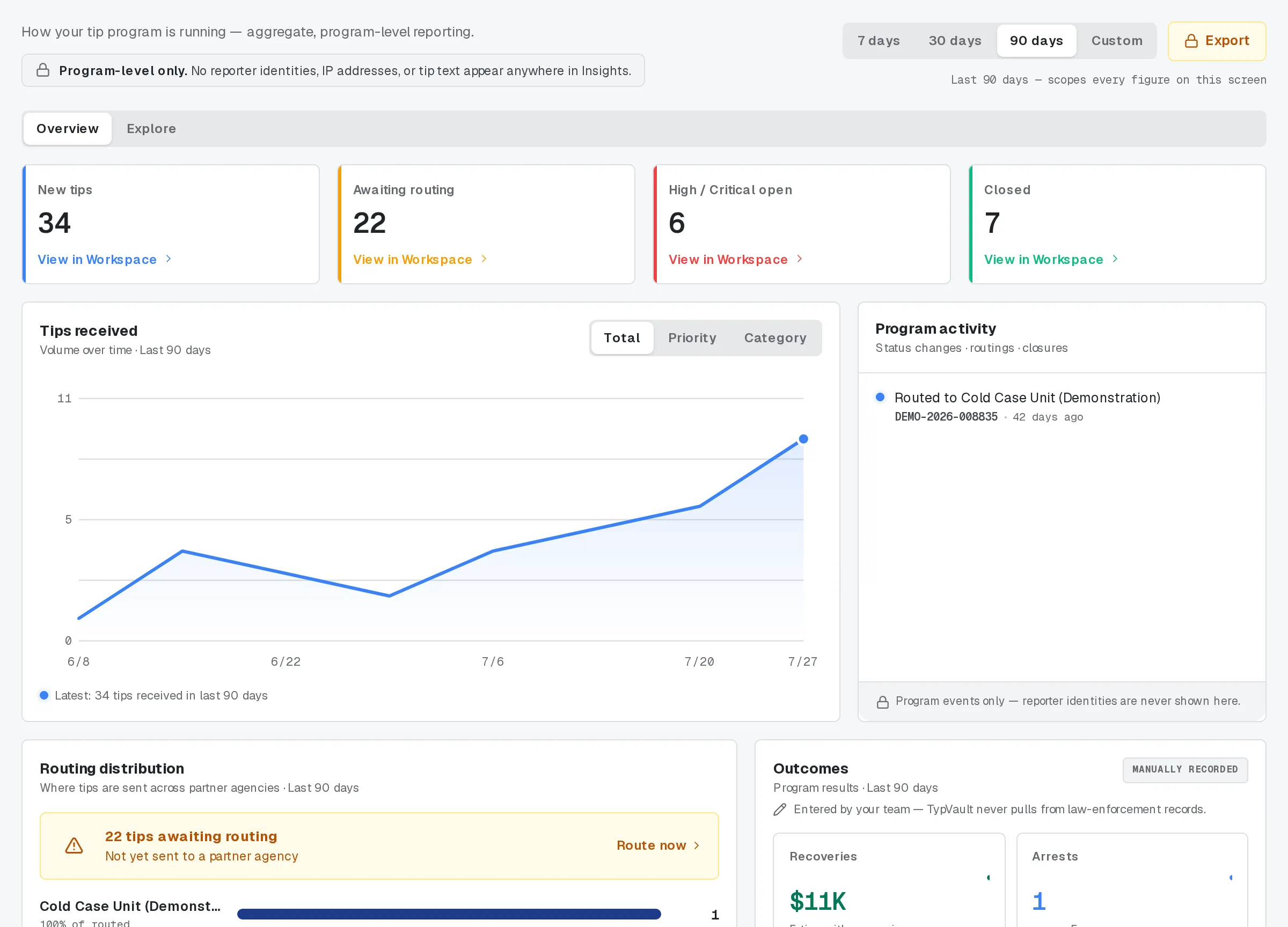
Insights for the last 90 days.
Outcomes are entered by hand
Section titled “Outcomes are entered by hand”Recoveries, arrests, and cleared cases don’t show up here on their own. An operator records them on the case itself, whenever the numbers are known. Nothing arrives automatically from an outside case-management system. If a number is missing, no one has entered it yet.

The Outcomes tab of a tip.
Exporting the aggregate figures
Section titled “Exporting the aggregate figures”Anyone viewing Insights as a program admin can pull the on-screen breakdown out as a CSV.
- Choose Export.
- Choose Aggregate insights (CSV).
- Write a reason, at least ten characters. It becomes part of the permanent record.
- Confirm. The file downloads right away.
This file holds totals only: a category, a label, and a number. It can’t carry a reporter’s identity or a case’s narrative, because it never reads either.

Reports.
Exporting tip records for legal discovery
Section titled “Exporting tip records for legal discovery”Pulling one row per case for a legal-discovery production works differently: your reason alone isn’t enough to run it. A different supervisor has to approve the request first. The same person can’t request and approve their own export.
- In the same Export dialog, choose Tip records (discovery).
- Set a scope: a start date, and optionally a status, category, or priority.
- Write a reason and submit. The request sits pending.
- Once a different supervisor approves it, run it from the requests list to download the file.
Even here, each row holds case-level fields only: a case reference, category, status, priority, dates, and reward status. The narrative and the reporter’s identity never leave through either export path.
Every export is on the record
Section titled “Every export is on the record”Whichever path you use, TypVault writes the export to the audit trail — your name, your reason, and what was pulled — before the data is read, so the record exists even if the download never finishes.
Related
Section titled “Related”- Access Review for supervisors
- Statuses, sub-statuses, and the case lifecycle
- Sensitivity classes and compartments
- Operator accountability
If a number here looks wrong, or you need an export this page doesn’t cover, ask your program admin.