After the call: workspace, replies, and the passphrase gate
Once you end the call, the tip from that call sits in Workspace with every other tip in the queue. If it needs a reply, the caller cannot read it until they set a passphrase of their own.
Where the tip lands
Section titled “Where the tip lands”The tip you took is not set apart from a tip someone submitted online. It sits in the same queue, under the same tabs, and opens to the same case view.
- Find it under All or Active, or search for it.
- Open it the way you would any other case.
Two things happen on their own once the call ends, with nothing for you to trigger: the tip is checked against other tips for a possible connection, and it goes through an automated safety check. Neither one is a person reviewing the tip while you were still on the phone. Both run afterward, on their own.
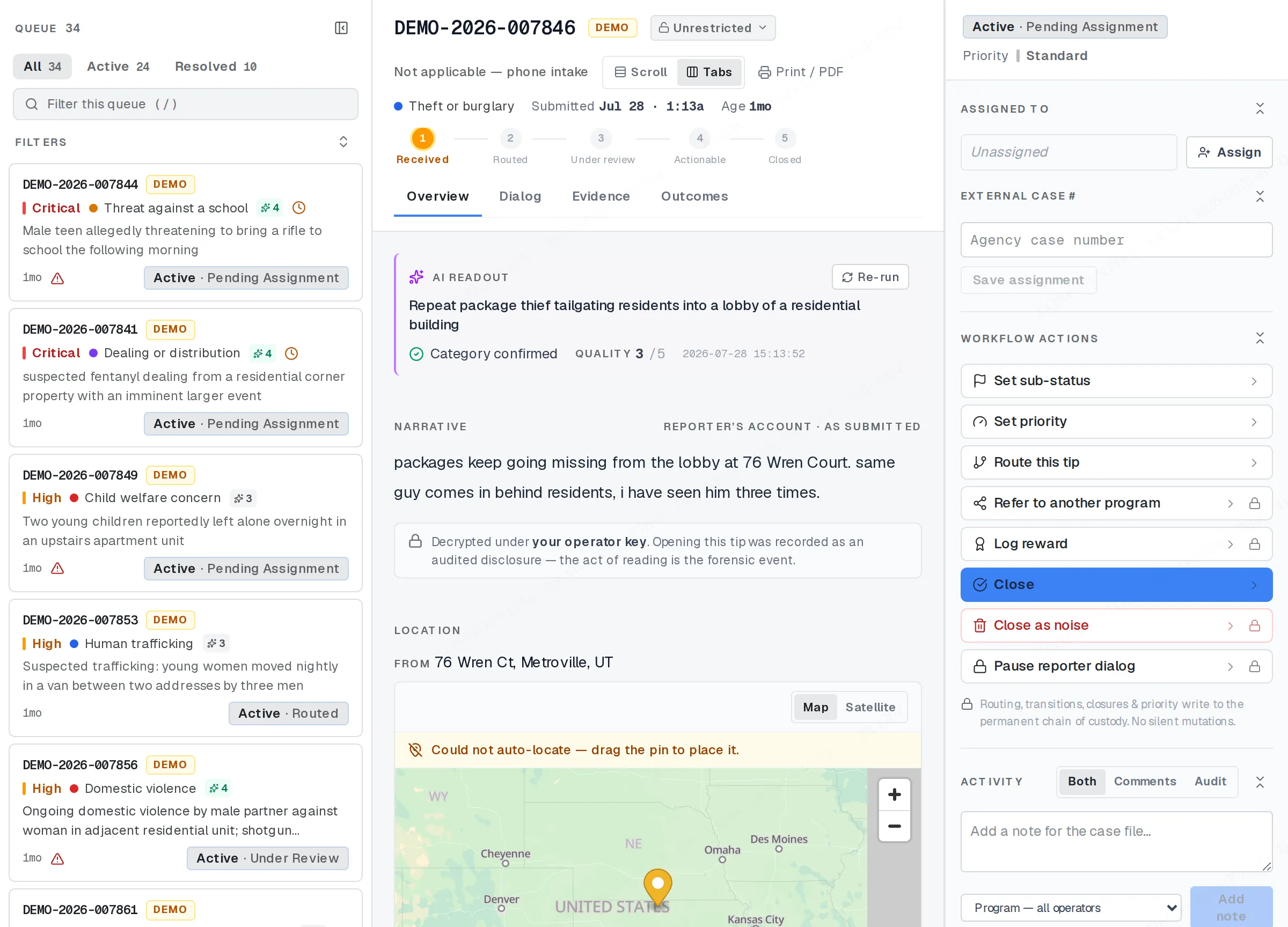
Where a phoned-in tip lands: the workspace, with the tip open.
Sending a reply
Section titled “Sending a reply”If the case needs a reply — a follow-up question, a request for more detail, anything your program wants to tell the caller — send it from inside the case, not from anywhere else.
- Open the tip in Workspace.
- Find the Dialog section, or use Messages in the left navigation. It shows the same thread.
- Type your reply and send it.
Why the caller might not answer
Section titled “Why the caller might not answer”This is the part that’s easy to miss on a phone-in tip: because the caller never set a passphrase during the call, they cannot read your reply, or send one back, until they add a passphrase themselves, at /dialog, using the retrieval code you gave them.
Until they do that, the code they hold shows them only the tip’s status. Your reply is not lost, and it is not bounced. It waits, unread, for as long as it takes. The same rule covers a reward: if the caller wants to collect one, they need a passphrase, not just the code.
Don’t chase this. There’s nothing to fix on your end. If the caller calls back, tell them how to add a passphrase: the same /dialog page, using their code.
Privacy discipline doesn’t end at hang-up
Section titled “Privacy discipline doesn’t end at hang-up”The conduit-mode rules that shaped the call still hold once you’re working the case afterward:
- Never keep the caller’s retrieval code, anywhere. If you need the tip again, find it in Workspace by category, date, status, or case number: never by trying to remember who called.
- Never write any fragment of the caller’s identity anywhere, including a local notepad.
- Never keep a personal mapping between a caller and a case number, even to jog your own memory for a callback.
- Never keep an off-system copy of a tip’s content: no pasted narrative, no saved screenshot, no forwarded note.
Related
Section titled “Related”- Handing off the retrieval code
- Conduit mode: your role on the call
- Messaging a tipster
- Practice on the demo
If a reply looks stuck, or you’re not sure a passphrase was ever set, your program admin can check the case from their side.