Handing off the retrieval code
You hand off the retrieval code by reading it aloud to the caller once, right after you log the tip, and by never writing it down yourself.
This is the one moment on the call you cannot redo. Once you’ve read the code and hung up, the caller’s own copy is the only way back into that tip: not yours, not your program’s, and not anyone else’s.
What appears on screen
Section titled “What appears on screen”When you click Confirm & log tip in the read-back window, a new screen opens headed “Tip logged — hand off the code.” A case number sits near the top: that’s for your program’s records, and you never read it to the caller. Below it, in large print, is the code itself, under a heading telling you to read it aloud.
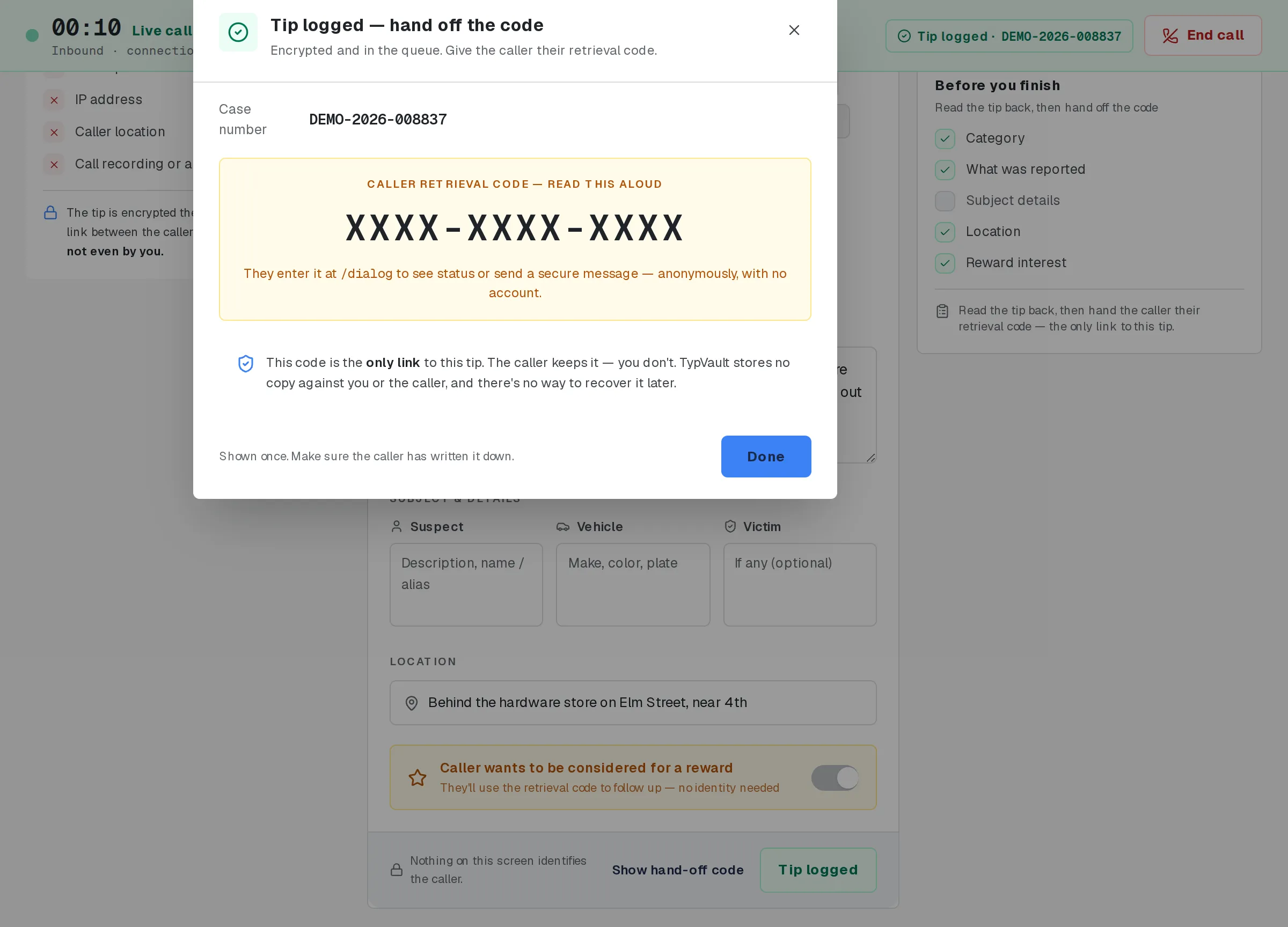
The hand-off screen. The retrieval code is masked in this picture.
Read this to the caller, in order
Section titled “Read this to the caller, in order”Use your own words for the rest of the call. This software doesn’t script your greeting or how you explain anonymity. At this one moment, read something close to the script below, in this order:
“Your tip is logged and it’s encrypted now. I’m going to read you a code. This is the only way either of us can ever look this tip up again, and if you lose it, nobody can recover it for you, including me. Please write it down right now:” [read the code slowly, in groups, for example, “A-B-C… one-two-three-four… five-six-seven-eight”] “There’s no password attached to this call, so you don’t need to remember anything else. That code alone lets you check your tip’s status anytime: go to your program’s site, then
/dialog, and enter it. But if you ever want to read a reply, send a follow-up message, or come back for a reward, you’ll first need to set a passphrase yourself, from that same/dialogpage, whenever you’re ready. There’s no account, no login, and no way for me to look any of this up for you afterward without that code.”
Have the caller read the code back to you before you hang up, so you both know it’s right.
Do not write it down
Section titled “Do not write it down”Don’t write the code on paper, in your notepad, in a ticket, or anywhere else, not even to finish out the call. The caller keeps the only copy; you don’t keep one at all.
Click Done, then click End call once you’re off the phone. Ending the call clears your notepad and resets the screen for the next caller.
What the code gets the caller back into
Section titled “What the code gets the caller back into”At /dialog, the code alone opens a status view: no name, no account, nothing else to enter.
If the caller wants to message you back, or collect a reward later, they set a passphrase themselves from that same page, whenever they’re ready. You don’t collect it, and you don’t need it.
That’s covered in full in After the call. For this step, all the caller needs is the code, read once.
The nine rules behind this moment
Section titled “The nine rules behind this moment”Everything above rests on nine rules. None of them bend, and none of them are settings you or your program can turn off:
- Never type the caller’s name, phone number, or any other identifying detail into any field on this screen. None of them are built to hold it.
- Never write anything that could identify the caller into the in-call notepad. It’s local and it clears when the call ends, but it still isn’t built to hold that.
- Never use the Suspect, Vehicle, or Victim boxes for the caller’s own details. Those describe who the tip is about, never who is calling it in.
- Never treat anything as saved before you log the tip: the timer, the notepad, and every capture field live only in your browser until you confirm and log.
- Never search for, or act on, who placed a call: the search panel matches tip content only.
- Never read the case number to the caller: it’s for your program’s records, not theirs.
- Never write the retrieval code down anywhere yourself, at any point, for any reason.
- Read the retrieval code aloud to the caller exactly once, and only to the caller.
- Never look the tip up for the caller afterward. You have no way to, and saying so is part of the hand-off.
What you don’t keep
Section titled “What you don’t keep”Nothing about the caller follows you past the call. You never retain:
- the caller’s retrieval code
- any caller identity fragment, anywhere, including in a local notepad
- any personal mapping between a caller and a case number
- any off-system copy of tip content
If it would let someone connect a caller to a tip later, it doesn’t get written down, typed anywhere, or kept in any other system, not for a minute, and not “just this once.”
If the call drops before the tip is saved
Section titled “If the call drops before the tip is saved”Nothing is saved until you click Confirm & log tip. If the caller hangs up before that, the tip doesn’t exist, and there’s no code to hand off. The caller would need to call back and start over.
Related
Section titled “Related”If a caller’s situation doesn’t match these steps, follow your program’s call-handling policy.