How phone intake differs: conduit mode
Phone intake differs from typical tip-line software in one way that shapes everything else on this screen: you never learn who the caller is, because the screen gives you nowhere to find out. You work as a conduit, carrying the caller’s account into the record. You never keep a record of who they are.
The screen has no caller-identity field
Section titled “The screen has no caller-identity field”Other call-taking software often has a field for the caller’s phone number, a caller ID, or a callback contact. This screen has none of those, on purpose. Everything you fill in — category, narrative, subject details, location — describes the tip itself, never the person calling it in.
A panel on the call screen, labeled “Not captured,” lists four things it does not ask you to type, no matter who’s calling or what they say:
- Caller phone number
- IP address
- Caller location
- Call recording or audio
The panel describes what that list is for: “What makes you a conduit, not a record of the caller.” It isn’t a setting your program can turn off. It’s a fixed description of what this screen can and can’t do.
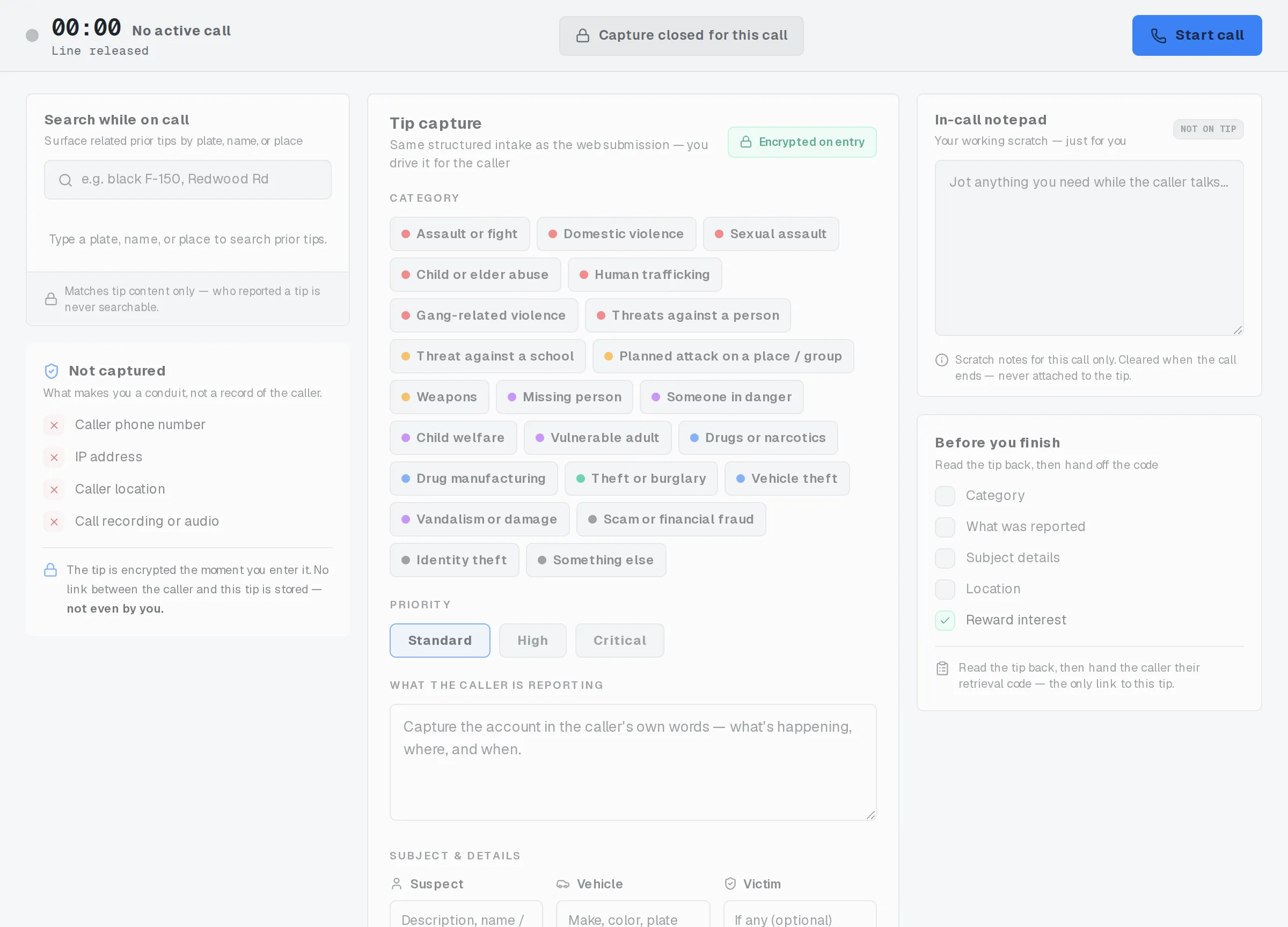
The screen has no field for anything about the caller.
No caller passphrase during the call
Section titled “No caller passphrase during the call”A caller submitting a tip online sets their own passphrase along the way. A caller phoning it in does not: you never ask for one, and there’s nowhere on this screen to enter one.
Instead, the tip gets a system-generated retrieval code, read aloud once at the end of the call. On its own, that code lets the caller check the tip’s status later, nothing more. If they want to read a reply, send one, or collect a reward, they set a passphrase themselves afterward, from the follow-up page, using the same code. That happens after the call, never during it, and never through you.
Handing off the retrieval code and After the call cover both sides of that in full.
Nine rules keep you a conduit
Section titled “Nine rules keep you a conduit”All of this comes down to nine rules. None of them are settings, and none of them bend for a specific caller or case:
- Never type anything that could identify the caller — a name, a phone number, or anything similar — anywhere on this screen, including the notepad.
- Never write down the caller’s retrieval code yourself. The caller keeps it; you don’t.
- Never keep a personal note that maps a caller to a case number.
- Never keep an off-system copy of tip content: no separate document, message, or file with what the caller told you.
- Treat the in-call notepad as scratch for this call only. It’s never sent anywhere, and it clears the moment you end the call.
- Search by tip content only. It’s never a way to look up who reported a tip.
- Read the retrieval code aloud once, and have the caller read it back to confirm it. Don’t keep a copy of it anywhere else.
- There’s no field for a caller’s phone number, IP address, location, or a recording of the call. Don’t improvise one elsewhere.
- Treat nothing as saved until you’ve confirmed and logged the tip. Until then, nothing you’ve typed has gone anywhere.
These rules aren’t a one-time checklist. They apply the same way on every call, whether the tip is routine or critical.
What you don’t keep, even to help yourself later
Section titled “What you don’t keep, even to help yourself later”Nothing about the caller follows you past the call, not even a note meant only to jog your own memory. You never retain:
- the caller’s retrieval code
- any caller identity fragment, anywhere, including in a local notepad
- any personal mapping between a caller and a case number
- any off-system copy of tip content
If it would let someone connect a caller to a tip later, it doesn’t get written down, typed anywhere, or kept in any other system, not for a minute, and not “just this once.”
Related
Section titled “Related”If a caller’s situation doesn’t match these rules, follow your program’s call-handling policy before improvising.